
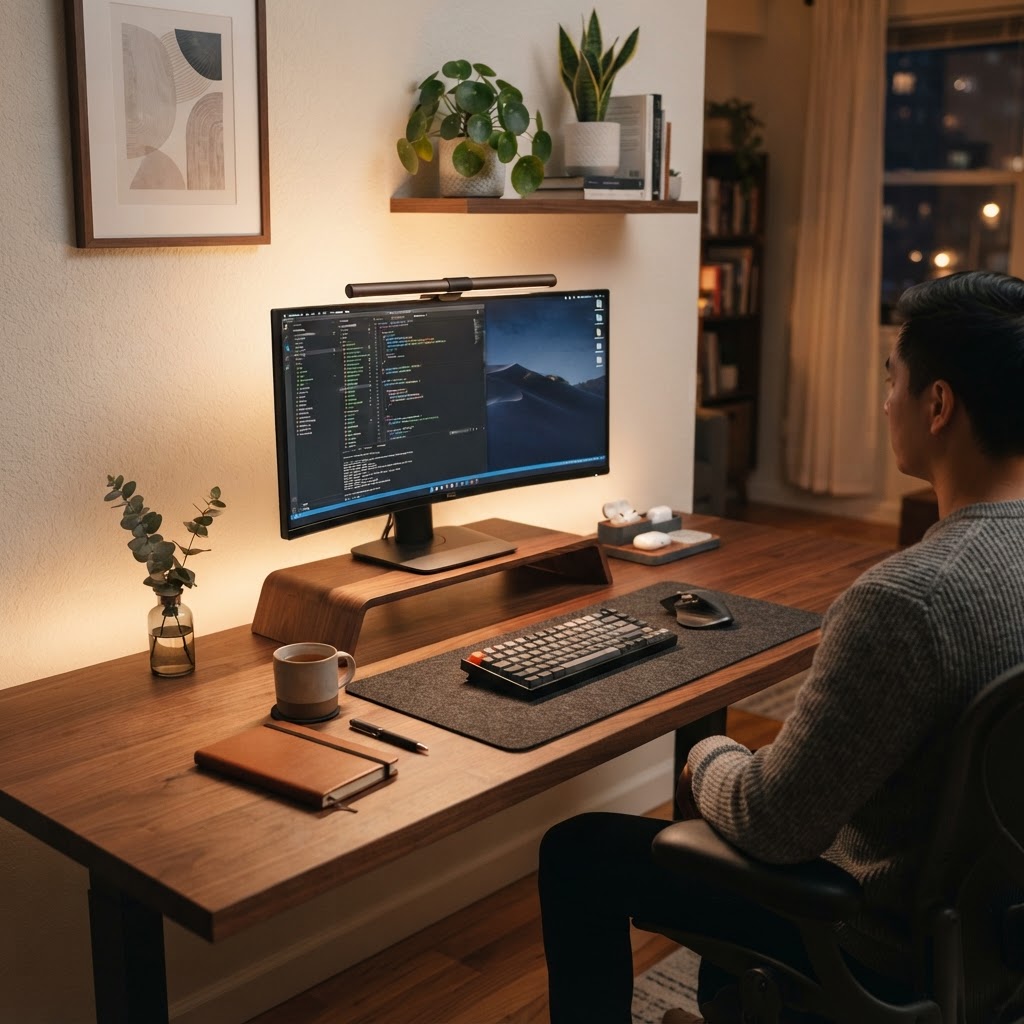
Good home office lighting is easy to underestimate. A desk can have a great monitor, comfortable chair, and tidy cable setup, but poor light still leaves you squinting, fighting screen glare, or feeling tired halfway through the afternoon. The right lighting setup makes it easier to read, stay focused, and finish work without the end-of-day eye strain.
This guide explains how to build a productive home office lighting setup in 2026 without turning your desk into a photography studio. You will learn where to place lights, which color temperature works best, and which upgrades are worth buying first.
Why home office lighting affects productivity
Your eyes constantly adjust when a bright monitor sits in a dark room. That contrast can contribute to fatigue, headaches, and the urge to take unplanned breaks. A balanced setup keeps the area around your screen comfortably lit while reducing reflections on the display.
Lighting also influences the feel of a workspace. Bright, neutral light can help you stay alert during a morning work block, while warmer light is more comfortable for evening planning or reading. The goal is not maximum brightness; it is consistent, indirect light with minimal glare.
The three layers of a productive desk setup
1. Ambient light
Ambient light fills the room so your monitor is not the only bright object in your field of vision. Start with a ceiling fixture, floor lamp, or wall light aimed at a surface rather than directly at your eyes. If your room has a window, use daylight as your main ambient source when possible, but avoid placing the screen directly in front of or behind the window.
2. Task light
A desk lamp provides focused light for notebooks, paper documents, and hands-on work. Place it on the opposite side of your writing hand to reduce shadows. Choose a lamp with an adjustable arm and a shade that hides the bulb from your normal seated position.
3. Bias or monitor light
A soft light behind the monitor gently brightens the wall behind your display. This reduces the harsh transition between the screen and the room. A monitor light bar is especially useful on a small desk because it provides screen-area illumination without taking up surface space.
What color temperature should you choose?
For most daytime office work, look for a bulb around 3,500K to 5,000K. This range feels neutral to slightly cool without looking excessively blue. For evening work, 2,700K to 3,500K is usually more comfortable and less harsh.
The best choice is often an adjustable smart bulb or lamp with multiple color temperatures. Set a brighter neutral scene for focused work and a warmer scene for winding down. If you use a smart bulb, schedule the change automatically so your lighting supports your routine instead of becoming another decision.
How bright should a home office be?
Use the lowest brightness that lets you read comfortably. Overly bright lamps create glare and can make a monitor look washed out. If your lamp has a dimmer, start around the middle setting and adjust it after sitting at your desk for ten minutes.
Watch for reflections: turn off the lamp briefly and look for bright spots on your screen. Move the light farther to the side, raise it above eye level, or bounce it off a nearby wall. Small placement changes usually solve glare better than buying a more expensive bulb.
Five practical lighting upgrades worth considering
- Adjustable LED desk lamp: Best first upgrade for reading, writing, and video calls.
- Monitor light bar: A space-saving choice for compact desks and dual-monitor setups.
- Smart color-changing bulb: Useful if your office serves as a work area and evening room.
- Bias lighting strip: Adds gentle backlighting behind a monitor or standing desk.
- Blackout or light-filtering shades: Helpful when afternoon sun creates inconsistent glare.
Recommended on Amazon
These are practical starting points for improving a home office lighting setup. Check the current price, dimensions, and reviews before purchasing.
- Adjustable LED desk lamps for focused task lighting
- Monitor light bars for glare-free workspace illumination
- Smart LED bulbs with adjustable color temperature
- LED bias-lighting strips for soft backlighting
Disclosure: As an Amazon Associate, we earn from qualifying purchases. This post contains affiliate links, which means we may receive a commission at no additional cost to you.
Final setup checklist
Put the brightest light behind or beside your monitor, not in your eyes. Add a dimmable task lamp for paper work, keep screens away from direct window glare, and use warmer light as the evening progresses. If you only make one change, improve the placement and consistency of your light before spending money on premium hardware.
A comfortable lighting setup is one of those small upgrades that pays off every workday. It makes your desk easier to use, your screen easier to see, and your focus routine a little less tiring.
Leave a Reply